# Migrating from nextjs 10 to 11 @smallcase
We had recently upgraded one of our codebases which uses [Next.js](https://nextjs.org/) with a custom webpack configuration from Next 10 to 11 [@smallcase](https://www.smallcase.com/) and as part of this upgrade, we also updated all the webpack related plugins and loaders to their latest version to make them compatible with webpack 5 which nextJS 11 comes with out of the box. So in this blog, I will be sharing some of the problems we faced while doing this upgrade and the solutions we used to solve them.
## Next.js at smallcase
Before diving into the upgrade let's first talk about what our next.js setup looks like. A lot of our [products](https://www.smallcase.com/smallcase-for-businesses) at smallcase use next.js but in this blog, I will be specifically talking about smallcase.com. The next.js setup that we have is a little different from the traditional next.js apps because of the following reasons:
### 1. Support for dynamic routing
This codebase was started when the latest available version for next.js was **v7**. At this time next.js didn't have a lot of features that are currently available and one of the major features lacking at that time was dynamic routing (Eg: A dynamic route looks like: `/blog/:id`) which later then got [introduced in next.js v9](https://nextjs.org/blog/next-9#dynamic-route-segments).
So at that time to support dynamic routing in our web app we used a combination of the next JS [custom server](https://github.com/vercel/next.js/tree/7.0.0#custom-server-and-routing) and the [next-routes](https://github.com/fridays/next-routes) package.
> Note: The next-routes package has stopped receiving any updates from 2018 and is not recommended to use with the latest version of next.js. Instead, next.js provides this feature out of the box now (from version > 9) so one should use that. We also have plans to migrate away from this setup in the future.
### 2. transpiling modules from node_modules
Currently, no official support for transpiling modules from `node_modules` is provided by next.js. So to support this use case, we use the [next-transpile-modules](https://www.npmjs.com/package/next-transpile-modules) package.
To explain why we need this let's go through the diagram below to understand how we use components in our smallcase ecosystem.
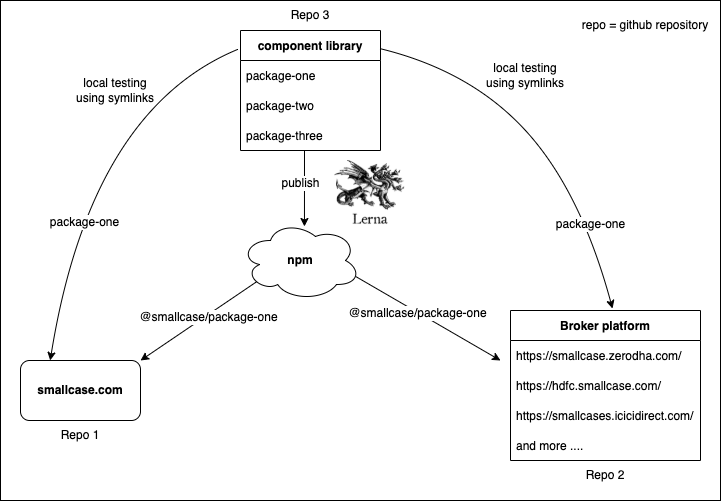
1. smallcase.com: Our B2C web platform
2. Broker platform: Our multi-tenant B2B web platform for different brokers like [Zerodha](https://smallcase.zerodha.com/), [HDFC](https://hdfc.smallcase.com/), etc.
3. Component library: A [monorepo](https://en.wikipedia.org/wiki/Monorepo) of shared components maintained using [lerna](https://lerna.js.org/).
We currently have two codebases that use a lot of common components so instead of writing the same component again and again and then maintaining them at two different places we instead create the common components in a different repo of its own. This repo is a monorepo where we create and maintain components in different packages with the help of lerna. So overall we have 2 repos that use common components from a 3rd repo.
We use two different ways for consuming the packages from the component library:
1. local testing using symlinks: Before publishing the packages we sometimes want to test the package locally on the consumer codebases (i.e [smallcase.com](http://smallcase.com/) and Broker platform) to test their working and for this, we symlink the packages.
2. Publishing on npm: When the package/component is completed we publish it to our private npm registry and then consume them like any other npm package available.
But before publishing the packages currently, we do not transpile them in our component library as we have a few packages which depend on getting some information from the consumers before transpiling (some variables which are required as input at build time to modify a few packages according to the consumer needs) and because of this reason currently we need to transpile this component library on the consumer codebases and due to this reason we need to use the `next-transpile-modules` package in our [smallcase.com](http://smallcase.com) codebase.
### 3. CSS modules usage
For CSS we use [css modules](https://github.com/css-modules/css-modules) through the [babel-plugin-react-css-modules](https://www.npmjs.com/package/babel-plugin-react-css-modules) npm package. This package makes it easier to use CSS modules by introducing a new prop called `styleName` which can be used on all components and it provides the following features:
1. With CSS modules, we are forced to use the camelCase naming convention for naming our CSS classes which is not required here.
```css
/* css modules */
.btnPrimary
/* babel-plugin-react-css-modules */
.btn-primary
```
2. We don't need to refer to the styles object every time we use a CSS Module.
```js
/* css modules */
import styles from './Button.css'
```
```js
/* babel-plugin-react-css-modules */
import './Button.css'
```
3. A clear distinction between global CSS and CSS modules, e.g.
```JSX
```
Now to use this babel plugin for all our CSS files we need to:
1. configure `css-loader` for which we have to use a [custom webpack config](https://nextjs.org/docs/api-reference/next.config.js/custom-webpack-config) through which we enable the use of CSS modules.
2. The `styleName` prop handling is done by `babel-plugin-react-css-modules` for which we also have a [custom babel config](https://nextjs.org/docs/advanced-features/customizing-babel-config).
### 4. Static assets support
For supporting static assets like images and custom fonts we currently use `file-loader` and `url-loader` which are configured through a rule in our [custom webpack config](https://nextjs.org/docs/api-reference/next.config.js/custom-webpack-config).
## Why did we decide to upgrade?
As part of our engineering practices at smallcase, once every 2 quarters or so we analyze the different dependencies present in our project using tools like `npm audit` and `npm outdated` and figure out which dependencies have got new updates or any security problems and accordingly try to upgrade them whenever possible. We like to keep our dependencies upgraded to the latest version so that we can use the latest available features and also mitigate any possible security issues. It had also been quite some time since we had not updated a few of our old dependencies related to our custom webpack setup in this codebase, so this was a good opportunity for upgrading them.

Also next.js 11 brings quite a lot of performance improvements and new features like:
- [Improved startup time](https://nextjs.org/blog/next-11#improved-performance): They have optimized their internal babel setup to reduce the startup time which will give us a faster developer experience which is definitely something every dev would love to have.
- [Webpack 5](https://nextjs.org/blog/next-11#webpack-5): With next.js 11, webpack 5 is now enabled by default which brings quite a lot of [performance improvements](https://nextjs.org/blog/next-10-2#webpack-5) with it.
- [next/script](https://nextjs.org/blog/next-11#script-optimization): A new component from next.js for automatically prioritizing the loading of third-party scripts to improve performance.
- [Conformance](https://nextjs.org/blog/next-11#conformance): Conformance is a system that has been open-sourced from Google's Web Platforms team. It is a system that provides a set of rules to support optimal loading and Core Web Vitals (in the future they also plan to add support for other quality aspects like security and accessibility). They provide these rules to next.js in form of an [eslint-plugin](https://nextjs.org/docs/basic-features/eslint#eslint-plugin) and next.js 11 now comes with out-of-the-box support for eslint making it easier to catch common framework-specific issues during development and at build time.
- [next/image](https://nextjs.org/blog/next-11#image-improvements): Further improvements to the existing `` component next.js provides which includes features like automatic image size detection and support for blur-up placeholders.
## The Upgrade: Process, Problems faced, and their solutions
After going through the [official migration guide](https://nextjs.org/docs/upgrading#upgrading-from-version-10-to-11) from next JS for upgrading to nextJS 11, we first found out the dependencies we will need to upgrade:

### 1. React
- `react`
- `react-dom`
With next 11 the minimum required version from react is changed to `v17.0.2`. We didn't face any problems when upgrading `react` and `react-dom` from v16 to v17. No new features were included in this upgrade of react but there were a few breaking changes which can be [checked out here](https://reactjs.org/blog/2020/10/20/react-v17.html).
### 2. Webpack and related plugins and loaders
With next 11, webpack 5 comes out of the box but as we are using a custom webpack configuration we needed to [upgrade few more dependencies](https://nextjs.org/docs/messages/webpack5#custom-webpack-configuration):
- `html-loader`
- `mini-css-extract-plugin`
- `css-loader`
- `terser-webpack-plugin`
> Note: NextJS gives an option to opt-out of the default webpack 5 upgrade too and stick to webpack v4 but it is recommended to use webpack 5 as it offers [these benefits](https://nextjs.org/docs/messages/webpack5#why-this-message-occurred) and also with nextJS v12 [webpack 4 support is dropped](https://nextjs.org/docs/upgrading#webpack-4-support-has-been-removed).
#### html-loader
No problems were faced when upgrading `html-loader`. There were quite a few breaking changes in [v1](https://github.com/webpack-contrib/html-loader/releases/tag/v1.0.0) and [v2](https://github.com/webpack-contrib/html-loader/releases/tag/v2.0.0) but we didn't have to make any changes in our codebase for this upgrade.
#### mini-css-extract-plugin
As part of the breaking changes in [v1](https://github.com/webpack-contrib/html-loader/releases/tag/v1.0.0) and [v2](https://github.com/webpack-contrib/html-loader/releases/tag/v2.0.0) of this plugin, a few options were removed but as we were not using those options there was no direct impact on our codebase.
One error that we saw when upgrading to v2.0.0 of this plugin was:
```bash
(0, _identifier.getUndoPath) is not a function
```
which was eventually found out that it was a problem within the plugin when more people started [reporting the same error](https://github.com/webpack-contrib/mini-css-extract-plugin/issues/837). This got fixed in [version v2.4.1](https://github.com/webpack-contrib/mini-css-extract-plugin/releases/tag/v2.4.1) of this plugin.
#### terser-webpack-plugin
For this plugin, a lot of plugin options were either deprecated or removed out of which the only thing that impacted us was the config for removing comments in the final build. For this we did the following change in our config:
```javascript
// old config options
new TerserPlugin({
terserOptions: {
comments: false,
output: {
comments: false,
},
},
})
// new config options
new TerserPlugin({
extractComments: false,
terserOptions: {
format: {
comments: false,
},
},
}),
```
These options are how the terser plugin now recommends using if we want to [remove all comments](https://github.com/webpack-contrib/terser-webpack-plugin#remove-comments) from the build.
#### css-loader
We were using a pretty old version of `css-loader` i.e v`0.28.8` before the upgrade. [v1](https://github.com/webpack-contrib/css-loader/releases/tag/v1.0.0) and [v2](https://github.com/webpack-contrib/css-loader/releases/tag/v2.0.0) had a lot of breaking changes in it, where a lot of loader options were removed or replaced but we were not using them so that didn't affect us.
But when upgrading to [v3](https://github.com/webpack-contrib/css-loader/releases/tag/v3.0.0), `localIdentName` option in the loader was removed in favor of `modules.localIdentName` so we had to do the following change in our loader config:
```javascript
// old config options
{
loader: 'css-loader',
options: {
...
// old syntax
modules: true,
localIdentName: '[name]__[local]__[hash:base64:5]',
},
}
// new config options
{
loader: 'css-loader',
options: {
...
// new syntax
modules: {
localIdentName: '[name]__[local]__[hash:base64:5]',
},
},
},
```
After that when we tried to upgrade the loader to [v4](https://github.com/webpack-contrib/css-loader/releases/tag/v4.0.0) we started facing a few issues in our setup. This is what the home page of smallcase.com looked like after the upgrade:

After debugging the problem it was found out that the `babel-plugin-react-css-modules ` plugin we are using is not compatible with `css-loader` which is causing this issue. The hash generated for the class names by `css-loader` and `babel-plugin-react-css-modules ` plugin needs to be the same for the plugin to work but this was not happening after upgrading `css-loader` to v4 because of which the appropriate CSS was not getting applied to the components.
```html
....
```
```css
/* hash generated by css loader */
.HeaderContainer__container__ND0QF {
flex-direction: column;
position: fixed;
left: 0;
right: 0;
top: 0;
}
```
As you can see from the code above different hash are getting generated for the same CSS class name because of which the CSS is not getting applied to the components.
It was then found out that the problem is with the `babel-plugin-react-css-modules` plugin:
%[https://github.com/gajus/babel-plugin-react-css-modules/issues/291]
`css-loader` made some changes in their hash generating algorithm so now `babel-plugin-react-css-modules` plugin also needs to update the same in their plugin. But turns out the last update this plugin received was on **11 May 2011** so it does not seem like this going to be fixed.
So for now we decided to stick with `v3.6.0` of `css-loader` for the short term but in the long term, we will have to figure out a better solution here.
---
#### Few loaders and plugins that were replaced as part of the upgrade:
| Dependency | Replaced with |
| ----------- | ----------- |
| `optimize-css-assets-wepback-plugin ` | `css-minimizer-webpack-plugin` |
| `file-loader ` | [asset module](https://webpack.js.org/guides/asset-modules/) provided by webpack 5 |
| `url-loader ` | [asset module](https://webpack.js.org/guides/asset-modules/) provided by webpack 5 |
#### optimize-css-assets-wepback-plugin
For webpack 5 and above it was [recommended by the plugin](https://github.com/webpack-contrib/css-minimizer-webpack-plugin) to use [css-mimizer-webpack-plugin](https://github.com/webpack-contrib/css-minimizer-webpack-plugin) instead of we replaced this plugin with that.
#### filer-loader and url-loader
With webpack 5, [asset modules](https://webpack.js.org/guides/asset-modules/) were introduced which come out of the box with webpack 5 and help to use assets files (images, fonts, etc) without installing any other additional loaders.

So, this was a good sign to let go of `file-loader` and `url-loader` and to welcome assets modules in our setup.
```javascript
// before asset modules
{
test: /\.(ttf|svg|png)$/,
loader: 'url-loader?limit=50000',
}
// after asset modules
{
test: /\.(ttf|svg|png)$/,
type: 'asset',
parser: {
dataUrlCondition: {
maxSize: 50000,
},
},
}
```
### 3. Postcss and related plugins
As it was recommended in the [nextJS migration guide](https://nextjs.org/docs/messages/webpack5#custom-webpack-configuration) to upgrade all your webpack-related plugins and loaders to their latest version, we also upgraded postcss and its related plugins from v7 to v8 as part of this upgrade.
- `postcss`
- `postcss-custom-media`
- `postcss-custom-properties`
- `postcss-flexbugs-fixes`
- `postcss-import`
- `postcss-loader`
- `postcss-mixins`
- `postcss-nested`
- `postcss-simple-vars`
- `autoprefixer`
- `postcss-hexrgba`
The only problem we faced was while upgrading the `postcss-hexrgba` dependency so I will be only talking about that in this section.
#### postcss-hexrgba
As the name of the plugin suggests, this was used to convert hex color values to rgb. We used this plugin as most of the global colors were defined in the hex format and stored as a CSS variable. Using this plugin we could use those hex color variables as rgba values too.
Example:
```css
:root {
--color-black: #00000;
}
/* In a component */
.card {
/* here hexrgba plugin coverts hex to rgb */
color: rgba(var(--color-black), 0.5);
}
```
But it was found out that this particular plugin was not actively maintained and due to that it was also incompatible with postcss version 8. Due to this reason, we had to remove this plugin from our setup.
With the removal of this plugin we also had to manually change the way we were using hex values inside `rgba()` throughout our codebase:
```css
:root {
--color-black: #00000;
}
/* rgb version of the same color */
:root {
--color-black-rgb: 0, 0, 0;
}
/* In a component */
.card {
color: rgba(var(--color-black-rgb), 0.5);
}
```
### 4. NextJS and related plugins:
- `next`
- `@next/bundle-analyzer`
- `next-transpile-modules`
The only problem we faced was while upgrading the `next-transpile-modules` dependency here so I will be only talking about that in this section.
#### next-transpile-modules
Before the upgrade, we were using a pretty old version of this package i.e **v2.0.0** so when upgrading this package to **v8.0.0** we had to go through a lot of breaking changes for which we had to make a few changes in the codebase.
- In v3: `transpileModule` property was removed from the global config object in `next.config.js`. `next-transpile-modules` now exposes a function that takes an array of strings (the modules you want to transpile) as its first parameter. So for this, we had to change the way we pass module name to next transpile inside `next.config.js`.
```javascript
// Inside next.config.js
// prev usage
const withTM = require('next-transpile-modules');
module.exports = withBundleAnalyzer(
withTM({
transpileModules: ['@smallcase'],
// other config options
...
}),
);
// new usage
const withTM = require('next-transpile-modules')(['@smallcase']);
module.exports = withBundleAnalyzer(
withTM({
// other config options
...
}),
);
```
- v5: A new module resolution strategy was introduced. Previously regex was used to find if a file should be transpiled or not. Now it has changed to use `require.resolve` instead. This now requires the module we want to transpile to have a compulsory main field in package.json. So now just mentioning ['@smallcase'] as module name will not work. To fix this we are now reading all scoped package names from package.json inside `next.config.js` and passing them to next-transpile-module.
The config from the above example was further modified to:
```javascript
const packageJson = require('./package.json');
const { dependencies } = packageJson;
const smallcaseScopedPackages = Object.keys(dependencies).filter((str) =>
str.startsWith('@smallcase'),
);
const withTM = require('next-transpile-modules')(smallcaseScopedPackages);
module.exports = withBundleAnalyzer(
withTM({
// other config options
...
}),
);
```
- [In v4.1](https://github.com/martpie/next-transpile-modules/releases/tag/4.1.0) a new option param was introduced called `resolveSymlinks`. Its value is set to true now by default. This causes a problem when we try to symlink a package from our component library to this codebase for local testing of the package:
%[https://github.com/webpack/webpack/issues/1643#issuecomment-601046261]
- So to solve this we need to make `config.resolve.symlink = false` in the `next.config.js` when trying to use a package locally i.e symlinking a package from our component library for local testing of the package.
## The Result
After the upgrade, a few immediate benefits that we noticed were:
1. The final build size got reduced
We used to `@next/bundle-analyzer` plugin to check the before and after upgrade bundle size and
we observed the following:
- Client bundle: Around **18%** drop in the bundle size
- Server bundle: **54%** drop in the bundle size
2. The Cold start up time of the development sever reduced
A significant drop (around **50%**) in the cold start-up time was seen when trying to use the codebase in dev mode.
3. Time to load a new page in dev mode also got reduced.
Overall we got what next.js promised us i.e a faster development experience.
## Future plans
1. Our major focus is to first move away from packages that are no longer receiving any updates:
- Starting with `next-routes` first as next.js now already have supports dynamic routing out of the box.
- We also need to think about how we are going to maintain using `babel-plugin-react-css-modules` with `css-loader` or maybe move away from it as `css-loader` keeps getting new updates whereas `babel-plugin-react-css-modules` has stopped receiving any updates, making them more and more incompatible.
2. Start experimenting and using new features provided by next.js. With next.js 11 we got a lot of new features like [conformance](https://nextjs.org/blog/next-11#conformance), [next-script](https://nextjs.org/blog/next-11#script-optimization), and improvements in [next-image](https://nextjs.org/blog/next-11#image-improvements) which we would definitely like to try out and see what benefits we can get out of them.
## References
1. The [official migration guide](https://nextjs.org/docs/upgrading#upgrading-from-version-10-to-11) from next.js.
2. [Webpack 5 benefits with next.js 11](https://nextjs.org/blog/next-10-2#webpack-5)
3. [Conformance for Next.js](https://web.dev/conformance/#conformance-in-next.js)
4. [Webpack 4 to 5 migration guide](https://webpack.js.org/migrate/5/)